Model a process
From an empty file to a validated Camunda 8 model with a gateway and two pools. Along the way: how to address elements, how to batch changes with bpmn apply, and how to act on a warning. A line ... stands for output left out.
1. Create the file and the first steps
--target camunda8 makes every result report what Camunda 8 would refuse at deploy.
$ bpmn new order.bpmn "Order handling" --target camunda8
written: order.bpmn
$ bpmn add order.bpmn start "Order received"
...
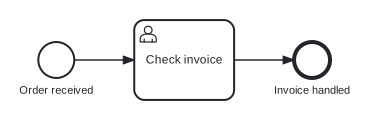
$ bpmn add order.bpmn userTask "Check invoice" --after startEvent_orderReceived
created userTask: userTask_checkInvoice
warning W_DEAD_END userTask_checkInvoice: userTask userTask_checkInvoice "Check invoice" has no outgoing flow  (Continue the flow (`bpmn add <file> <kind> "<Name>" --after userTask_checkInvoice`) or end it (`bpmn add <file> endEvent "<Name>" --after userTask_checkInvoice`).)
...
$ bpmn add order.bpmn end "Invoice handled" --after userTask_checkInvoice
...
state: 0 errors, 0 warnings (bpmn validate lists them and runs the project's lint)
written: order.bpmn
Three things to know:
- Elements are addressed by id, never by name. A new id is made from the kind and the name (
userTask_checkInvoice), a flow id from its ends (flow_checkInvoiceToInvoiceHandled). An unknown id is refused with the ids that were probably meant. - A flag says where, a
key=valuesays what.--after,--before,--flow,--in,--onand--laneplace the element;timer=P2D,doc="Four eyes"orcamunda:assignee=kermitset what it holds. An unknown key is refused with the keys the element takes. - A warning names its fix. Copy the command from the parentheses.
2. Branch with one batch
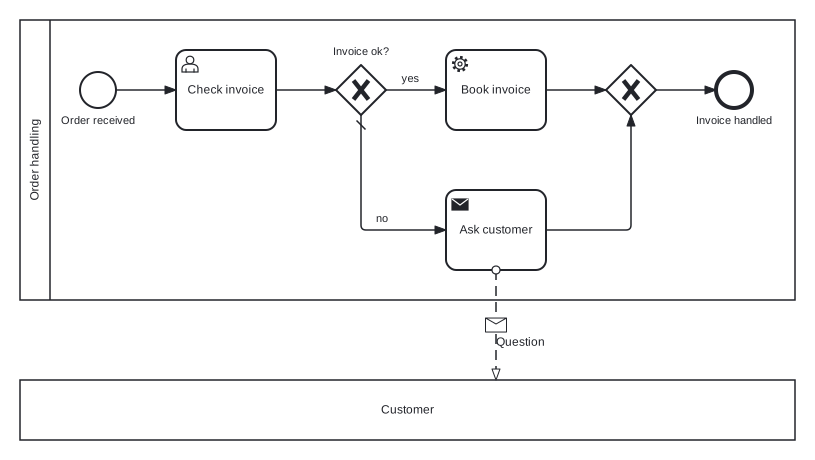
A change that touches more than one element goes into one bpmn apply batch: all or nothing, one layout pass, and only the final state is validated. split inserts a gateway, its branches and the join. "as": "$book" names a new element for later operations, so they never guess its id.
{
  "ops": [
    {
      "op": "split",
      "after": "userTask_checkInvoice",
      "name": "Invoice ok?",
      "branches": [
        {
          "flowName": "yes",
          "condition": "= ok",
          "nodes": [{ "kind": "serviceTask", "name": "Book invoice", "as": "$book" }]
        },
        {
          "flowName": "no",
          "default": true,
          "nodes": [{ "kind": "sendTask", "name": "Ask customer", "as": "$ask" }]
        }
      ]
    },
    {
      "op": "ext",
      "id": "$book",
      "action": "add",
      "type": "zeebe:taskDefinition",
      "attrs": { "type": "book-invoice" }
    }
  ]
}$ bpmn apply order.bpmn ops.json
created exclusiveGateway: gateway_invoiceOk, gateway_invoiceOkJoin
aliases: $book = serviceTask_bookInvoice, $ask = sendTask_askCustomer
...
renamed: flow_checkInvoiceToInvoiceHandled -> flow_checkInvoiceToInvoiceOk
warning W_C8_DEPLOY_IMPLEMENTATION sendTask_askCustomer: sendTask sendTask_askCustomer has no zeebe:taskDefinition (nor a zeebe:publishMessage): Camunda 8 needs the job type a worker subscribes to and refuses the file (Give it a job type: `bpmn ext add <file> sendTask_askCustomer zeebe:taskDefinition type=<jobType>`.)
...
state: 0 errors, 1 warning (bpmn validate lists them and runs the project's lint)
written: order.bpmn
How a batch is written:
- An operation is
"op"plus the flags of the command of the same name in lowerCamelCase (--flow-namebecomesflowName). Thekey=values go under"set". - The input is an array of operations or
{"ops": [...]}. Unknown keys are refused. - Drawing operations (
place,color,layout, ...) come after the model operations. --dry-runruns a risky batch without writing.
Besides "as", an operation can name the flow into its new node ("flowAs"), the flow out of it ("outAs"), a split's join ("joinAs") and the message or error of a trigger ("refAs"). bpmn guide ops lists every operation with its keys.
3. Fix the warning
$ bpmn ext add order.bpmn sendTask_askCustomer zeebe:taskDefinition type=ask-customer
changed: sendTask_askCustomer
...
state: 0 errors, 0 warnings (bpmn validate lists them and runs the project's lint)
written: order.bpmn
4. Add pools and a message flow
Add the normal pool first: it wraps the existing process. A --black-box pool is an empty one for the other side.
$ bpmn add order.bpmn participant "Order handling"
note: collaboration collaboration_orderHandling created; participant_orderHandling wraps the existing process orderHandling
...
$ bpmn add order.bpmn participant "Customer" --black-box
...
$ bpmn connect order.bpmn sendTask_askCustomer participant_customer message=Question
created messageFlow: messageFlow_askCustomerToCustomer
layout quality: score 0 -> 5; added: crossings flow_invoiceOkToBookInvoice x messageFlow_askCustomerToCustomer
...
$ bpmn layout order.bpmn
layout quality: score 5 -> 0; resolved: crossings flow_invoiceOkToBookInvoice x messageFlow_askCustomerToCustomer
...
A write keeps the drawing and fits new elements in, which can cost a crossing. A model built from scratch over several writes ends with bpmn layout, which redraws it in one piece. On a drawing a person made, fix the spot instead (Layout).
5. Read and validate
$ bpmn show order.bpmn
...
process orderHandling "Order handling" executable in participant_orderHandling
  startEvent startEvent_orderReceived "Order received" -> userTask_checkInvoice (flow_orderReceivedToCheckInvoice)
  userTask userTask_checkInvoice "Check invoice" [ext: zeebe:userTask] -> gateway_invoiceOk (flow_checkInvoiceToInvoiceOk)
  exclusiveGateway gateway_invoiceOk "Invoice ok?" -> serviceTask_bookInvoice (flow_invoiceOkToBookInvoice "yes" if = ok), sendTask_askCustomer (flow_invoiceOkToAskCustomer "no" default)
...
$ bpmn validate order.bpmn
platform: c8 (modeler:executionPlatform "Camunda Cloud") - 0 refused at deploy, 0 runtime, 0 practice finding(s)
layout: ok
valid, 0 warning(s)
On a large model, read only what you change: bpmn show <file> <id> prints one element, --around <id> --depth 1 its neighbours, bpmn find <file> <text> searches ids and names.
Next
- Camunda 7 and 8: job types, mappings, forms and deploy checks.
- Commands: every command, key and exit code.