C4 model
Show how your software is built, at every level. Draw the C4 model of a software system in VS Code or in your browser, and keep it as a plain .c4 file next to the code it describes.
Try it now
Open the web app and pick Show example: no install, no account.
What the C4 model is
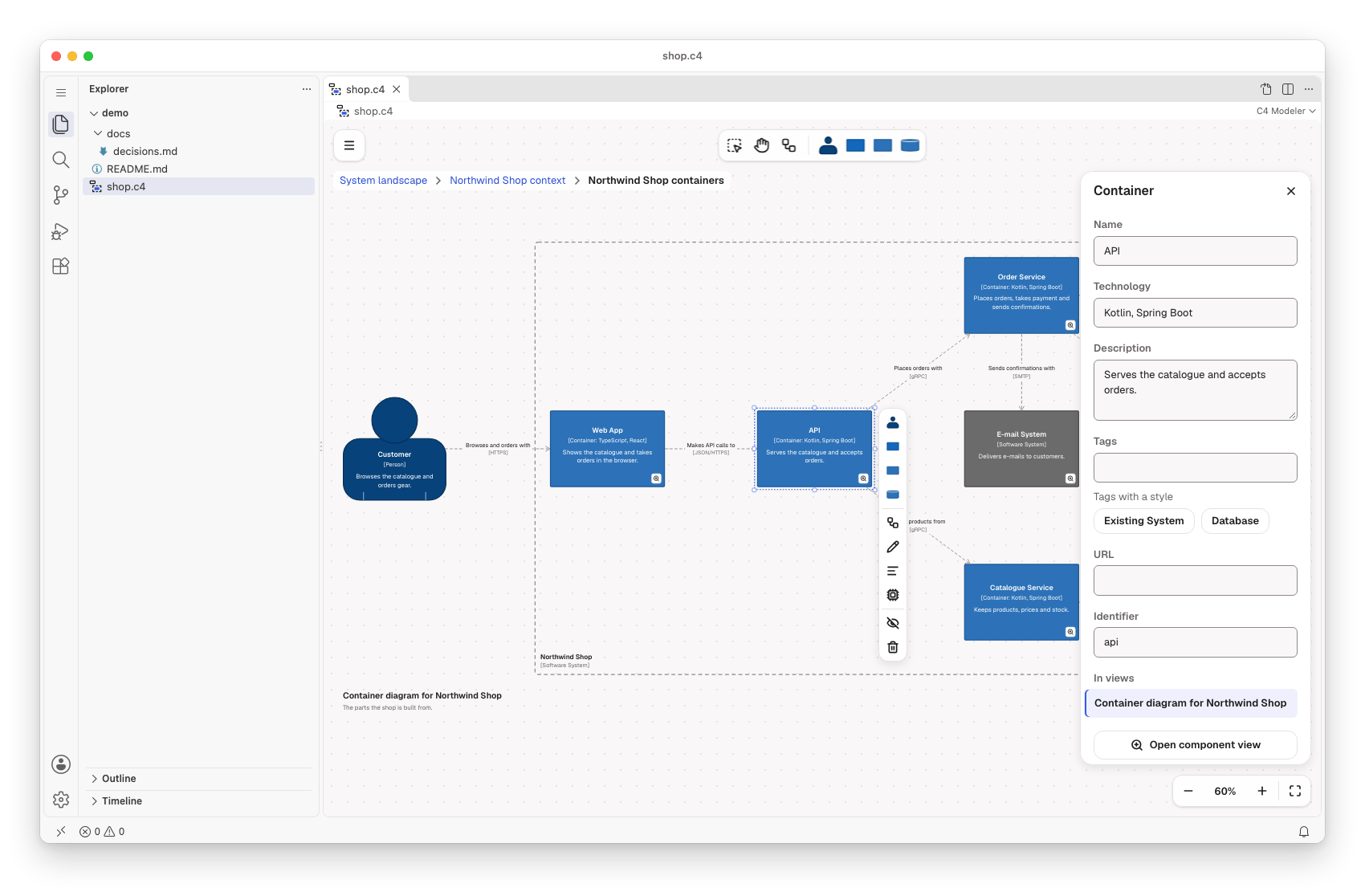
Simon Brown created the C4 model and describes it in his book Software Architecture for Developers. It draws a software system as a set of maps at four levels of zoom: context, containers, components and code. A context view shows who uses a system and what it depends on. A container view opens it into apps, services and databases, and a component view opens one container into its parts.
Each level answers a question for a different reader. A good model starts at the context and goes down only as far as someone needs to look.
Why it matters
- Developers, architects and product discuss the same boxes and lines instead of their own whiteboard sketches.
- Each view leaves out what its reader does not need, so newcomers start at the top.
- The model lives in the repository, so it changes in the same pull request as the code it describes.
The C4 model comes last in the suite: it answers how the software is built. Team Topologies before it shows which teams own that software; after it comes the code.
Draw it in the modeler
- People, software systems, containers and components
- System landscape, system context, container and component views
- Drill down from a system or container to the next level, and back up with the breadcrumb
- The layout of each view goes into the file, so moving a box is a one-line diff
- Classic C4 colours for new workspaces, and Model › Apply C4 colours for an existing one
Model and code side by side
A .c4 or .dsl file holds a Structurizr DSL workspace, read and written losslessly. Edit the canvas, and only the lines you touched change: what the modeler does not draw stays as written. Compatible with Structurizr DSL. Structurizr is a product of Structurizr Limited; this project is not affiliated with or endorsed by Structurizr Limited.
model {
    customer = person "Customer" "Browses the catalogue and orders gear."

    shop = softwareSystem "Northwind Shop" "Sells outdoor gear online." {
        webApp = container "Web App" "Shows the catalogue and takes orders in the browser." "TypeScript, React"
        api = container "API" "Serves the catalogue and accepts orders." "Kotlin, Spring Boot"
    }

    customer -> webApp "Browses and orders with" "HTTPS"
    webApp -> api "Makes API calls to" "JSON/HTTPS"
}
Use it where you work
- In the browser: c4.modeler.miragon.io. A reload or a copied link brings back the workspace and its view.
- In VS Code: the C4 Modeler opens
.c4files as diagrams; a.dslfile opens through Open Diagram to the Side. With LikeC4 installed, which uses.c4too, a LikeC4 model opens as text. Also on Open VSX. - In your own app:
npm install @miragon/c4-renderer - From source:
npm run c4 dev:webapp:plainopens the editor athttp://127.0.0.1:5182,npm run c4 dev:webappthrough Portless.
Next steps
- The README of the C4 modeler: views and drill-down, the layout in the file and the keyboard shortcuts.
- Build from source: build and run every modeler from the repository.