IDs from names
Turn random IDs like Activity_0x1y2z3 into IDs that read like the element's type and name, such as serviceTask_checkStock, for one element or the whole diagram.
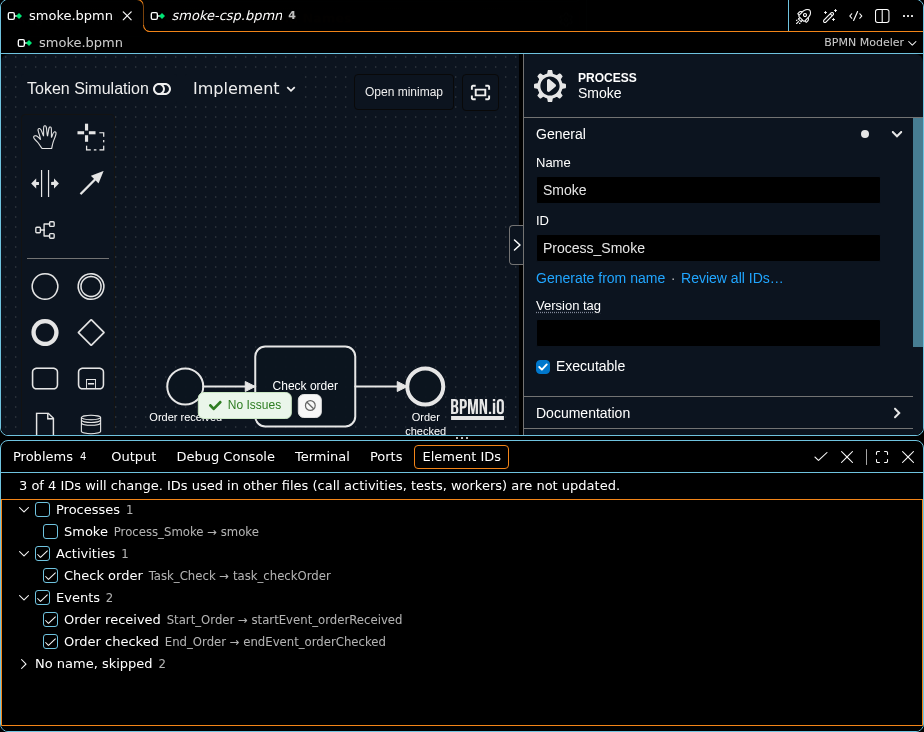
Review every ID
- Open a BPMN diagram in Design or Implement mode.
- Run Miragon BPMN Modeler: Generate IDs from Names from the Command Palette, or pick it from the … menu in the editor title bar.
- The Element IDs tab opens in the Panel, beside Problems and Output. It lists every ID a name would change, grouped by kind, as
current ID → new ID. Click a row to show its element on the diagram. - Untick the IDs you want to keep, and click Apply ID Changes (the check mark) in the tab's title bar. Processes start unticked: a process ID is the key that deployments, call activities and tests use, so tick its group only when you mean to change it.
Apply ID Changes renames every ticked element as one change, so one undo puts all IDs back. Discard ID Changes (the cross) closes the tab without changing anything. The list follows edits you make while it is open. The review belongs to one diagram, and closing that diagram ends it.
| Part of the tab | What it shows |
|---|---|
| The line above the list | How many IDs will change, and that IDs in other files keep the old ones. |
| Groups | Processes, pools, lanes, activities, events, gateways, flows and other elements. A group's checkbox ticks or unticks all its rows. |
A counter, such as sendTask_notifyCustomer2 | Two elements share a name and would get the same ID, so this one gets a counter. The row's tooltip says so. |
| Already match | Elements whose ID already follows their name, with or without a counter. They keep their ID. |
| No name, skipped | Elements without a name, or with a name that has no letter or digit to build an ID from. |
The Element IDs tab needs VS Code 1.80 or later. An older VS Code offers only Generate from name under the ID field (see below).
One element
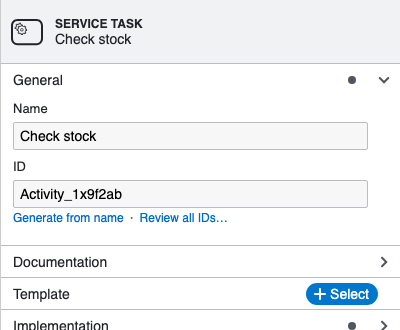
Select an element. Under its ID field in the properties panel, Generate from name renames this one ID, and Review all IDs… opens the review of the whole diagram in the Element IDs tab. The link is greyed out when the element has no name or its ID already follows the name.
How IDs are spelled
IDs follow the bpmnlint rule @miragon/rules/element-id-naming, so a generated ID never breaks it, whether or not linting is on. Without a configuration the rule's Miragon convention applies: the element's type in camelCase, an underscore, then the name in camelCase.
| Element | Name | ID |
|---|---|---|
| User task | Process data | userTask_processData |
| Service task | Check stock | serviceTask_checkStock |
| Start event | Payment received | startEvent_paymentReceived |
| Boundary or intermediate event | 10 days | event_n10Days |
| Gateway of any kind | Order valid? | gateway_orderValid |
| Sequence flow | yes | flow_yes |
| Data object | Invoice | dataObject_invoice |
| Process | Order fulfilment | orderFulfilment |
A process ID gets no type prefix: it is the deployment key that call activities and tests name, and the rule leaves it to the business.
camelCase starts with a letter, so a name that starts with a digit gets an
nin front: 10 days becomesevent_n10Days.When your
.bpmnlintrcconfigures the rule, generated IDs follow your convention, including a configuration the rule takes from a config you extend:json{ "extends": "plugin:@miragon/rules/recommended-for-automation", "rules": { "@miragon/rules/element-id-naming": [ "warn", { "case": "snake_case", "prefixes": { "bpmn:SequenceFlow": "Flow_" } } ] } }prefixeschanges the prefix of a type (falseleaves a type without one),casesets the case of the name (camelCase,PascalCase,snake_caseorkebab-case), and"eventDefinitionQualifier": "required"makes an event's ID name its definition, such asmessageStartEvent_orderReceived. A second element with the same name gets a counter in the same case:task_notify2,task_notify_2.After you turn a task into a service task, its ID
task_checkStockno longer follows: the review and Generate from name offerserviceTask_checkStock.ä,ö,übecomeae,oe,ue, andßbecomesss; other accents are dropped (Cafébecomescafe). Punctuation separates words, apostrophes do not. A name in a script other than Latin has nothing to build an ID from and is skipped.A pool's process takes its own name, or the pool's name when it has none: the pool Order handling gives
participant_orderHandlingandorderHandling.An ID in the diagram interchange that follows the element's ID, such as
Activity_1x9f2ab_di, follows the new ID too.
IDs that follow names
With miragon.bpmnModeler.elementIds.followName on, an element's ID changes as you change its name, on the canvas or in the properties panel, or its type, while the ID is still one the modeler made for that kind of element, random (Activity_0x1y2z3) or numbered (StartEvent_1), or was generated from the old name and type. An ID you typed yourself, such as Invoice_1, never changes, and neither does a process ID. One undo reverts the change and the ID together.
Settings
| Setting | Default | What it does |
|---|---|---|
miragon.bpmnModeler.elementIds.followName | false | Rename an ID along with its element's name and type, as described above. |
It can be set per workspace, in .vscode/settings.json. The spelling has no setting: it comes from the lint rule (see above).
Limits
- IDs in other files are not updated: call activities that start this process, a Camunda 8 process ID (which deployments and process instances use), process tests such as
hasPassed("…"), and job workers or listeners that name an element. Rename a process before its first deployment, or update those references yourself. - View mode cannot change IDs. The command then asks you to switch to Design or Implement; an open review says so until you switch back.
- An inline script editor that is open while its element is renamed keeps the old ID. Close it and open it again.
IntelliJ
Tools ▸ Miragon BPMN Modeler ▸ Generate IDs from Names opens the review in the Element IDs tool window along the bottom of the IDE. It shows the same groups and rows: tick or untick rows, select a row to show its element, and use Apply ID Changes or Discard ID Changes in the window's toolbar. The tool window is there only while a review is open. The links under the ID field are the same. The setting is under Settings ▸ Tools ▸ Miragon BPMN Modeler as IDs follow names, for all your projects.
Next steps
- Editor modes: Design and Implement can change IDs.
- BPMN plugins: the Camunda Modeler plugin this feature replaces, and others that still run.
- Configuration: every modeler setting.